
Stop digging through apps mid-conversation. Your LiNK digital business card now lives on your lock screen — ready in one tap.
You’re at a networking event. Someone asks for your card. You unlock your phone, open a browser, navigate to your dashboard… and by the time you get there, the moment has passed.
That’s the problem wallet integration solves.
With LiNK, you can add digital business card to Apple Wallet and Google Wallet integration, your digital business card lives exactly where your boarding passes and loyalty cards do — one swipe from your lock screen, always ready. This guide walks you through exactly how to set it up on iPhone and Android, and explains why it’s one of the smartest moves you can make for your networking game in 2026.
What Does “Adding a Business Card to Your Wallet” Actually Mean?
When people search for how to add a business card to Apple Wallet or Google Wallet, they’re looking for a way to make their contact info instantly accessible — without an app, without a login, without digging.
A digital wallet pass works just like any other pass on your phone. It installs directly into the native Wallet app on your device. On iPhone, that’s Apple Wallet — the same app where you keep your flight tickets and store loyalty cards. On Android, it’s Google Wallet — same place as your transit cards and payment methods.
Once installed, your LiNK QR code is one swipe away from your home screen. You show it. They scan it. Done.
No app for you. No app for them. No typos. No fumbling.
Why Add Your Business Card to Apple Wallet or Google Wallet?
Here’s the honest case for why this matters beyond the novelty:
Speed at the moment it counts. Networking moments are brief and spontaneous. Having your card accessible from the lock screen — without unlocking, without opening an app — removes every point of friction between you and the connection.
No app required for either side. The person you’re sharing with doesn’t need anything installed. They scan the QR code in your wallet and your full LiNK profile — contact details, social links, resume, portfolio — opens instantly in their browser.
It signals something. Pulling up a wallet pass is a small but distinct signal that you’re tech-forward and organized. It’s the same reason people notice when you pay with your watch instead of your card.
Your card stays current. Unlike a PDF or screenshot saved in someone’s photos, your wallet pass links to your live LiNK profile. Update your phone number, job title, or portfolio today — the pass reflects it immediately.
Works on Apple Watch too. For Apple Wallet users, your LiNK QR code can be shown directly from your watch. That’s genuinely useful at events where your phone is in your pocket.
How to Add Your LiNK Business Card to Apple Wallet (iPhone)
Adding your LiNK card to Apple Wallet takes under 60 seconds. Here’s exactly how to do it:
Step 1: Log into your LiNK Dashboard on your iPhone.
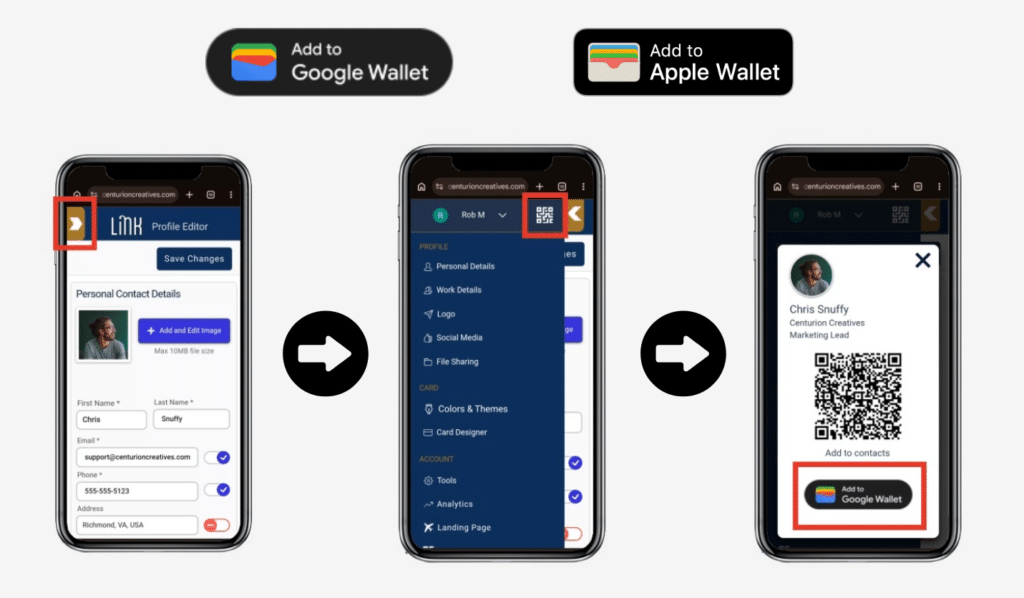
Step 2: Open up the menu and tap the QR button — you’ll see the option to select Apple Wallet.
Step 3: Your iPhone will prompt you to add the pass. Tap Allow when asked for permission.
Step 4: Tap Add to confirm. Your LiNK pass is now installed in Apple Wallet.
Step 5: To access it, swipe down from the lock screen or open the Wallet app. Your LiNK QR code is right there.
Pro tip: Add your LiNK Dashboard as a Home Screen shortcut and keep the wallet pass. The pass is your speed layer for live networking; the dashboard is where you access analytics, update your profile, and capture leads.
What your contact sees: When they scan the QR code in your wallet, your full LiNK digital business card opens in their browser. They can save your contact, download your resume, connect on LinkedIn, or use Client Connect to share their own info back to you — all from that one scan.
How to Add Your LiNK Business Card to Google Wallet (Android)
The process on Android for Google Wallet is nearly identical:
Step 1: Open your LiNK Dashboard on your Android device.
Step 2: Open up the menu and tap the QR button and select Google Wallet.
Step 3: Google Wallet will prompt you to save the pass. Tap Save.
Step 4: You’ll see a “Saved to Google Wallet” confirmation. Your LiNK card is now installed.
Step 5: Open Google Wallet or access it from your lock screen. Your LiNK QR code is ready to show.
Pro tip: On most Android devices, you can set Google Wallet to appear as a quick-access shortcut. This makes your LiNK QR code accessible without even unlocking your phone.
Apple Wallet vs. Google Wallet for Business Cards: Which One Should You Use?
If you have an iPhone, use Apple Wallet. If you have an Android, use Google Wallet. That’s genuinely the whole answer for most people.
But here’s what’s useful to understand about the difference:
Apple Wallet is iOS-only and has a more polished, consistent look. Your pass will look right at home alongside boarding passes and event tickets. It also works on Apple Watch, which is a real advantage at in-person events. In the US, where iOS holds a majority of the smartphone market, most of the people you’re networking with will be on iPhone.
Google Wallet runs on Android, which holds roughly 71% of the global mobile market. If your audience is international — particularly in Southeast Asia, Latin America, or South Asia — Google Wallet is the larger opportunity. It also offers more flexibility in pass design, including a hero image and action buttons.
The best answer: use both. LiNK generates passes for both platforms, so you don’t have to choose. Install both, and whichever phone you’re carrying, you’re ready.
LiNK Wallet Integration vs. the Competition
Most digital business card platforms treat wallet integration as an add-on or a premium feature. Here’s how LiNK stacks up:
| Feature | LiNK | Dot | Blinq |
|---|---|---|---|
| Apple Wallet Integration | ✅ | ❌ | ✅ |
| Google Wallet Integration | ✅ | ❌ | ✅ |
| Full Profile Behind QR (resume, files, analytics) | ✅ | ✅ | Limited |
| Two-Way Client Connect | ✅ | ❌ | ❌ |
| No App Required (for sender and receiver) | ✅ | ✅ | ✅ |
| Metal Card Option | ✅ | ✅ | ❌ |
| Starting Price | $3/mo | $10/mo | $5.89/mo |
The LiNK difference isn’t just wallet integration in isolation — it’s wallet integration as an access layer on top of a full digital business card platform. When someone scans your QR code from your wallet, they don’t just see your name and number. They get your full profile: contact details, resume, portfolio, social links, and a two-way connection feature that captures their info back to you.
Frequently Asked Questions
Can I add a digital business card to Apple Wallet for free?
Yes — LiNK’s Apple Wallet and Google Wallet integration is included in all LiNK plans starting at $3/month. There’s no additional fee or upgrade required.
Does the wallet pass update automatically when I change my LiNK profile?
Yes — LiNK’s Apple Wallet and Google Wallet integration is included in all LiNK plans starting at $3/month. There’s no additional fee or upgrade required.
Can I have my business card in both Apple Wallet and Google Wallet?
Yes, though you’ll only use one at a time since Apple Wallet is iPhone-only and Google Wallet is Android-only. If you carry both devices, install both.
Do I need an app to scan a LiNK wallet pass QR code?
No. The built-in camera on any iPhone or Android device can scan the QR code. No app required for the sender or the recipient.
Is LiNK’s wallet integration available for business accounts?
Yes. LiNK for Business accounts support wallet integration for all team members. Each employee’s individual LiNK card can be added to their device’s wallet independently.
Does Apple Wallet work on Android?
No. Apple Wallet passes (.pkpass files) are iOS-only. Android users should use Google Wallet. LiNK generates both, so you’re covered regardless of what device you’re on.
The Bottom Line
Adding your digital business card to Apple Wallet or Google Wallet is the single fastest upgrade you can make to your networking setup right now. The setup takes under 60 seconds, it’s included in your LiNK plan, and the difference it makes in a real networking moment — when you can pull up your card from the lock screen while the other person is still reaching for theirs — is immediate and tangible.
If you’re already a LiNK member, log into your dashboard and add to wallet today.
If you’re not a LiNK member yet, this is a good moment to start. Digital business card, metal card option, two-way contact capture, file and resume sharing, analytics, and now wallet integration — all starting at $3/month.
Start your 14-day free trial →
LiNK is a veteran-owned digital and metal business card platform built for professionals who move fast. Learn more at centurioncreatives.com.