
Every professional has experienced the same networking frustration: you hand out a dozen business cards at an event, collect a handful in return, and spend the next week trying to remember who was who — manually entering names, numbers, and emails one by one. Half the cards you received are already lost. Half the ones you handed out were thrown away.
LiNK Client Connect eliminates that problem entirely. Built into every LiNK Digital and LiNK Metal & Digital business card, Client Connect turns your QR code into a two-way lead capture tool — so every time someone scans your digital business card, you have the opportunity to capture their contact information instantly, automatically, and without any manual data entry on either side. LiNK solves the problem with traditional paper cards allowing you to easily capture leads with digital business cards.
How LiNK Client Connect Works
Step 1 — Someone Scans Your Digital Business Card QR Code
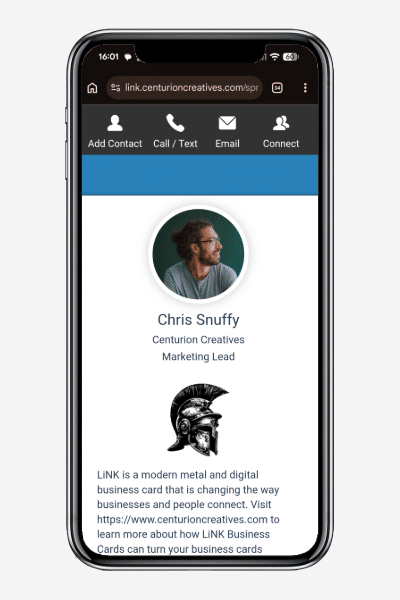
When a new contact scans your LiNK QR code — whether from your metal card, a paper card, your email signature, or anywhere else you’ve placed it — they land on your full LiNK digital profile in their browser. No app required on their end.
At the top of your profile they’ll see a “Connect with [Your Name]” button. One tap opens the Client Connect interface.
Step 2 — They Submit Their Contact Details
The Client Connect form prompts your new contact to enter their name, phone number, email address, company, and job title. If they choose, the system can also capture their geographic location. The form is mobile-optimized, takes less than 30 seconds to complete, and requires no account or app download.
Step 3 — Instant Two-Way Connection
The moment your contact submits their details, their information is sent directly to your LiNK dashboard in real time. No waiting, no manual transfer, no lost cards. The connection is logged instantly with a timestamp and location data so you always know when and where you met.
Step 4 — Leads Go Directly Into Your Contact List
Every contact captured through Client Connect is added automatically to your LiNK Contact List, where you can search by name, phone number, email, company, or geographic location. Whether you’re following up the next morning or reconnecting six months later, every lead you’ve ever captured is organized and searchable in one place — accessible from any device without an app.
Step 5 — Email Notifications Keep You Up to Date
LiNK sends you an email notification summarizing every new connection made in the past 24 hours, so you never miss a lead even when you’re away from your dashboard. Your new contacts also receive a confirmation that the connection was established — a professional touch that reinforces your brand and keeps the conversation open.2. Submit Client Details
The interface prompts new contacts to enter essential information, such as their name, phone number, email address, and company information. If they choose, the system can also capture their geographic location.
Why Two-Way Contact Sharing Changes the Networking Game
Most digital business card platforms are one-way tools — you share your information and hope the other person follows up. Client Connect flips that dynamic by making it effortless for your contacts to share back, turning a passive card share into an active lead capture moment.
For sales professionals, real estate agents, recruiters, and anyone who networks at conferences and trade shows, this distinction is significant. You no longer need to ask for a card, hunt for a pen, or trust that someone will look you up later. Client Connect captures the connection while the conversation is still warm — giving you a complete, organized lead list by the time you get back to your desk.
What You Can Do With Client Connect Data
Once your leads are in your LiNK Contact List, your Advanced Analytics dashboard gives you a complete picture of your networking performance:
- Geographic Map View — see exactly where your leads are located and identify which events and markets are generating the most connections
- Connection Trends — track how your network grows over time and identify peak networking periods
- Activity Heatmap — see which days and times your digital business card gets the most engagement so you can time your follow-ups strategically
- Lead Search — find any contact instantly by name, company, location, or email
No other digital business card platform combines two-way contact capture with this depth of analytics in a single dashboard — and it’s included with every LiNK plan starting at $3 per month.
Client Connect Is Included Free with Every LiNK Plan
Client Connect is not a premium add-on or an upgrade feature — it’s included automatically with every LiNK Digital and LiNK Metal & Digital subscription. There’s nothing to activate, no additional setup required, and no extra cost. Sign in to your LiNK dashboard and your Client Connect button is already live on your profile.
If you’re not yet a LiNK member, start your free 14-day trial and see how LiNK Client Connect transforms the way you capture leads at your next networking event. No credit card required.
Frequently Asked Questions About LiNK Client Connect
Does my contact need to download an app to use Client Connect?
No. Client Connect opens directly in any smartphone browser the moment your contact scans your QR code. There’s nothing to download on either end.
Is the contact information captured through Client Connect secure?
Yes. All contact data captured through Client Connect is encrypted and stored securely in your private LiNK dashboard. LiNK never shares your contact data with third parties.
Can I export my Client Connect leads?
Yes. You can download your full contact list directly from your LiNK dashboard to your phone or computer at any time — no app required.