Getting Started with LiNK
Thousands of stock color and template combinations
How to set up a digital business card
Setting up a digital business card with LiNK takes less than 10 minutes. This guide walks you through every step — from choosing your plan to sharing your unique QR code — so you can start making professional connections the same day. No app required, no technical experience needed, and no paper cards to reorder when your information changes.
LiNK is a web-based digital business card platform built for professionals who want to make a lasting impression. Whether you’re a solo professional, a small business owner, or managing a team, LiNK gives you a smart, shareable profile that works on every desktop and mobile device.
After completing your profile, you’ll be able to:
- Share files, portfolios, resumes and slick sheets in one location
- Update out-of-date information instantly
- Establish a stunning first impression with your brand
- Integrates seamlessly with social platforms and contact apps
- Environmentally friendly and cost-effective
- User analytics and engagement insights
- Digital Landing page to amplify your brand
- No app required. LiNK is web-based and compatible with every desktop or mobile device
- Two-way connection between customers and receivers with Client Connect feature
Step 1
Purchase Link Plan
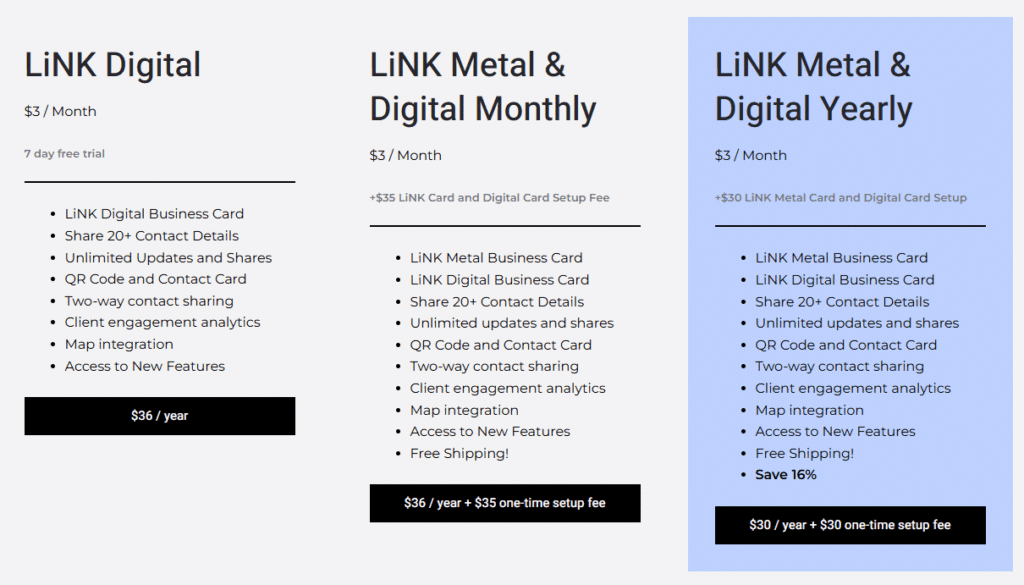
Choose a LiNK Digital or Digital and Metal Card Plan
*LiNK Metal cards can be purchased separately with a Digital Plan, or with an upgrade to a LiNK Pro Plan
Step 2
Update LiNK Profile
- Add, delete, change contact details as often as you want
- Share only what you want to share
- Your information is encrypted and secure.
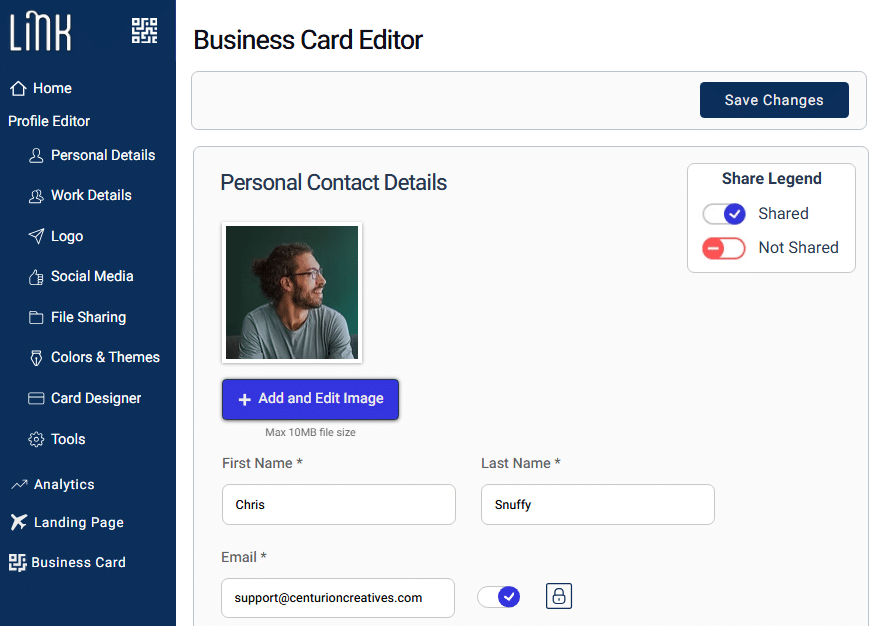
Your LiNK profile is your digital identity — and unlike a paper business card, you can update it anytime without reprinting anything. Here’s what you can add and manage from the Profile Editor:
- Contact details — phone numbers, email addresses, and physical or mailing addresses
- Social profiles — LinkedIn, Instagram, Facebook, X, and more
- File sharing — upload your resume, portfolio, slick sheet, or any document you want clients and contacts to access instantly
- Brand assets — your photo, company logo, and a short bio that tells people who you are and what you do
- Client Connect — LiNK’s two-way connection feature that lets the people you share with send their information back to you, turning a one-way share into a genuine lead capture
All information on your LiNK profile is encrypted and secure. You control exactly what’s visible — share everything, or keep certain details private. Changes go live instantly, so there’s no lag between updating your profile and what your contacts see when they scan your QR code
Step 3
Finalize LiNK Metal Card Order
At LiNK we amplify YOUR brand
Choose your Card Template and Color using our simple template designer
Metal cards ship 2-7 business days from template selection
Step 4
Start Connecting
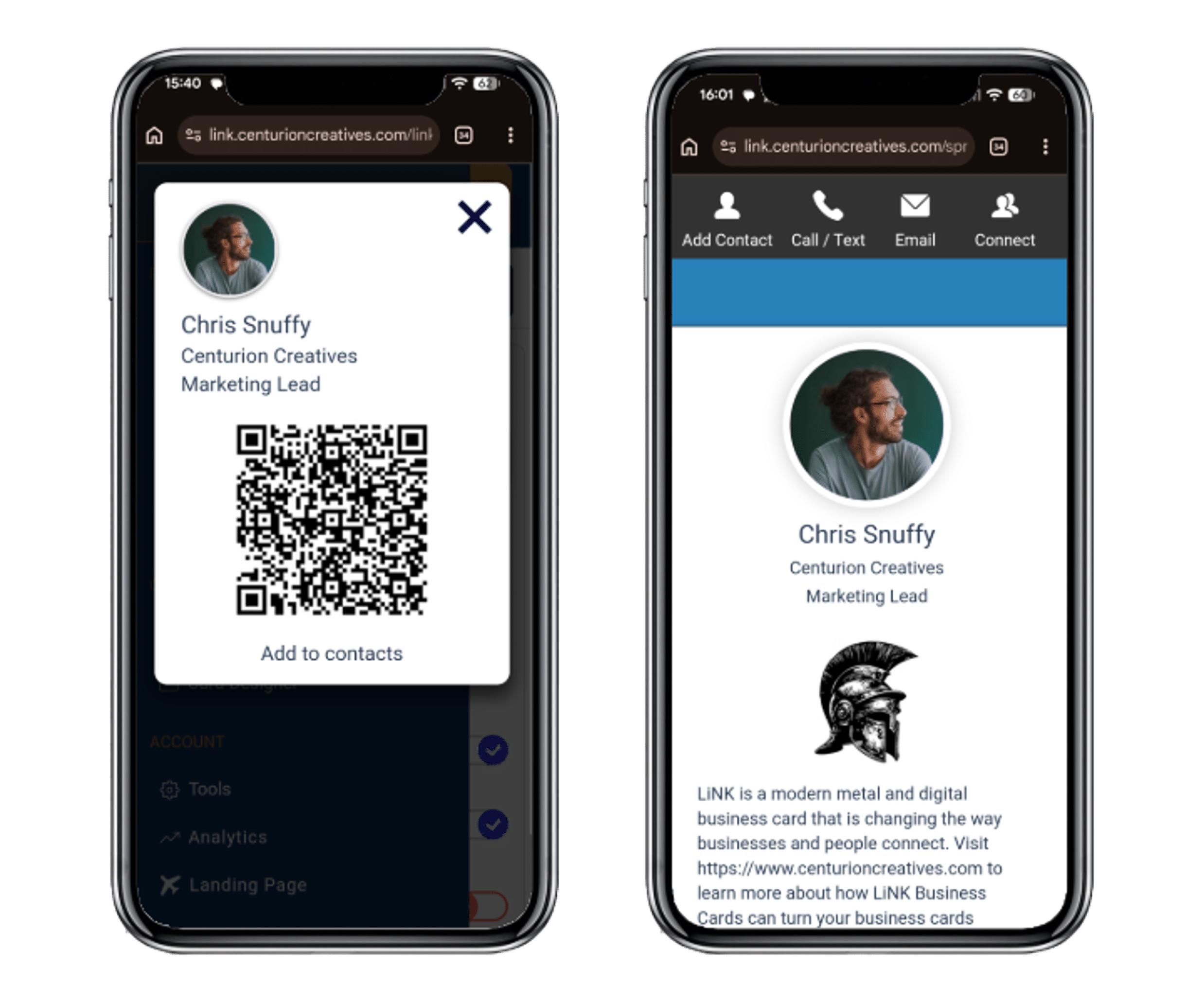
Visit the LiNK Dashboard on a desktop or mobile device to quickly share your unique QR code and LiNK Digital URL
No App required. Simply add your dashboard as a quick link on your mobile device home screen for fast access to your digital business card.
Download your QR code and use it on anything to reach clients and customers
Step 5
Add LiNK to Your Apple or Google Wallet

Your LiNK QR code can now live on your phone’s lock screen – no app, no dashboard, do digging. Just tap and share.
Adding LiNK to your wallet takes less than 60 seconds. Watch the short video for Android or iOS and you’ll be ready to connect faster than ever.
Tips for Getting the Most Out of LiNK
Add your QR code everywhere. Download your LiNK QR code from your dashboard and add it to your email signature, LinkedIn profile, slide decks, print materials, and anywhere else you want people to reach your digital profile instantly.
Save your dashboard as a home screen shortcut. Since LiNK is fully web-based, you can add your dashboard directly to your iPhone or Android home screen for one-tap access — just like an app, without the download.
Use analytics to follow up smarter. Your LiNK dashboard shows you who’s engaging with your card, which links they’re clicking, and when activity spikes. Use that data to time your follow-ups and focus on your warmest contacts.
Keep your profile fresh. The biggest advantage of a digital business card over paper is that it’s never out of date. Set a reminder every quarter to review your profile — update your title, swap in a new headshot, or add recent work to your portfolio.
FAQs
Do I need an app to use my LiNK digital business card?
No. LiNK is fully web-based and works on every smartphone and desktop browser. The people you share with don’t need to download anything either — your card opens instantly when they scan your QR code or tap your link.
Can I update details on my metal LiNK card after it’s printed?
Yes. Your metal card links to your live digital profile, not a static snapshot. Update your phone number, email, social links, or any other detail at any time and your QR code will always point to your current information.
How do I share my LiNK QR code?
You have several options: show your QR code directly from your LiNK Metal Card, LiNK Digital dashboard, send your unique LiNK URL via text or email, add your QR code to your email signature, or download it to print on any physical material.
What’s the difference between LINK Digital and LiNK Metal?
LiNK Digital is a complete digital business card solution — your profile, QR code, and all sharing features. LiNK Metal & Digital includes everything in the Digital plan plus a premium laser-engraved metal card that physically links to your profile via QR code.
What’s included in the free 14-day trial?
The trial gives you full access to your LiNK profile editor, QR code sharing, file uploads, and analytics. You can upgrade to a paid plan at any time during or after the trial, or cancel at any time.
Why should I get a digital business card?
Technology is changing the way people network and digital business cards optimize information sharing and real Return on Investment (ROI) for people on the go. With our Client Connect feature, card analytics and suite of digital tools, LiNK is empowering meaningful and impactful connections in a fast-paced digital world.
Article: Digital Business Cards: How They’re Changing The Way We Do Networking – Forbes.com
Can I use LiNK with my paper business card?
Yes. Your LiNK QR code is not limited to your metal card — you can print it on anything, including your existing paper business cards, and instantly add analytics, lead capture, and digital profile sharing to materials you already have. Simply download your unique LiNK QR code from your dashboard and add it to your paper cards, brochures, flyers, email signature, slide decks, trade show banners, or any other printed or digital material. Every scan from every surface feeds into your LiNK analytics dashboard, giving you real return on investment from networking materials you’re already using.
This means you don’t have to throw away your current paper cards to get started with LiNK. Add your QR code to your next print run and turn a static paper card into a dynamic, trackable networking tool. When prospects scan your code, they land on your full LiNK digital profile — with your contact details, social links, portfolio files, and a two-way Client Connect feature that lets them send their information back to you instantly.
For professionals who attend conferences, trade shows, or networking events, combining a paper card with a LiNK QR code is one of the fastest ways to start capturing leads and measuring which events are actually driving business.
Can I add my LiNK card to Apple Wallet or Google Wallet?
Yes! LiNK now supports both Apple Wallet and Google Wallet integration. Once added, your LiNK QR code is accessible directly from your phone’s lock screen — no need to open a browser, your dashboard, or any app. It’s the fastest way to share your card. Setup takes under a minute and works on any iPhone or Android device.